Design documents
v0.1.0Client-facing design documents in Word (architecture, network security, assessments) on the client's own template, checked so they read as written by a consultant.
Paste it into Claude Code, Cursor or Codex.
npx skills add keenskills/skills --skill writing-design-documentsWrite, check, fix
The skill’s own loop on the Contoso example (a fictional company): a first draft, the real check’s findings, the fixes, and the final document.
The draft was made by putting back five habits of generated text; its findings, the fixes and both documents are real output.
Network Security Design · first draft
Purpose
This document describes the proposed network security design for the Contoso pre-production web applications — the current configuration as of 24-Sep-2026, the target design and the changes needed to implement it.
Scope
In scope
- The three web applications and their private endpoints.
- Network security groups and application security groups in the spoke VNet.
Out of scope
- Hub network resources, which are managed by the hub team.
Current State
This section summarises the configuration of the pre-production subscription, captured with read-only Azure CLI commands.
| Resource | Public access | Private endpoint |
|---|---|---|
| app-contoso-portal, Web app | Disabled | 10.20.1.4 |
| sql-contoso-data, Azure SQL | Enabled | 10.20.1.5 |
| Table 1: Findings | ||
|---|---|---|
| # | Finding | Impact |
| 1 | sql-contoso-data allows public access with the ‘Allow Azure services’ rule. | Any Azure resource can reach the public endpoint, regardless of subscription. |
Proposed Architecture
Internet traffic enters through an Application Gateway with WAF. We recommend a robust approach that leverages private endpoints throughout; the database stays private once the application teams confirm their dependencies.
Implementation Plan
Note. The cloud team applies each change in an agreed change window.
| # | Activity | Owner |
|---|---|---|
| 1 | Disable public access on sql-contoso-data and remove the ‘Allow Azure services’ rule | Cloud team |
$ python scripts/docbuilder.py check contoso-draft.docx1punctuation: 1 x em dash4semicolon in prose: 'Internet traffic enters through an Application Gateway with WAF. We re'5inline bold or bold lead-in: 'Note. The cloud team applies each change in an agreed change window.'2provenance/banned wording: 'azure cli'2provenance/banned wording: 'cli'2provenance/banned wording: 'read-only'3AI-sounding word: 'leverages'3AI-sounding word: 'robust'
A skill for Claude Code and other coding agents for producing client-facing design documents in Word (architecture, network security, assessments) on the client's own template, written so they read as prepared by a consultant rather than generated.
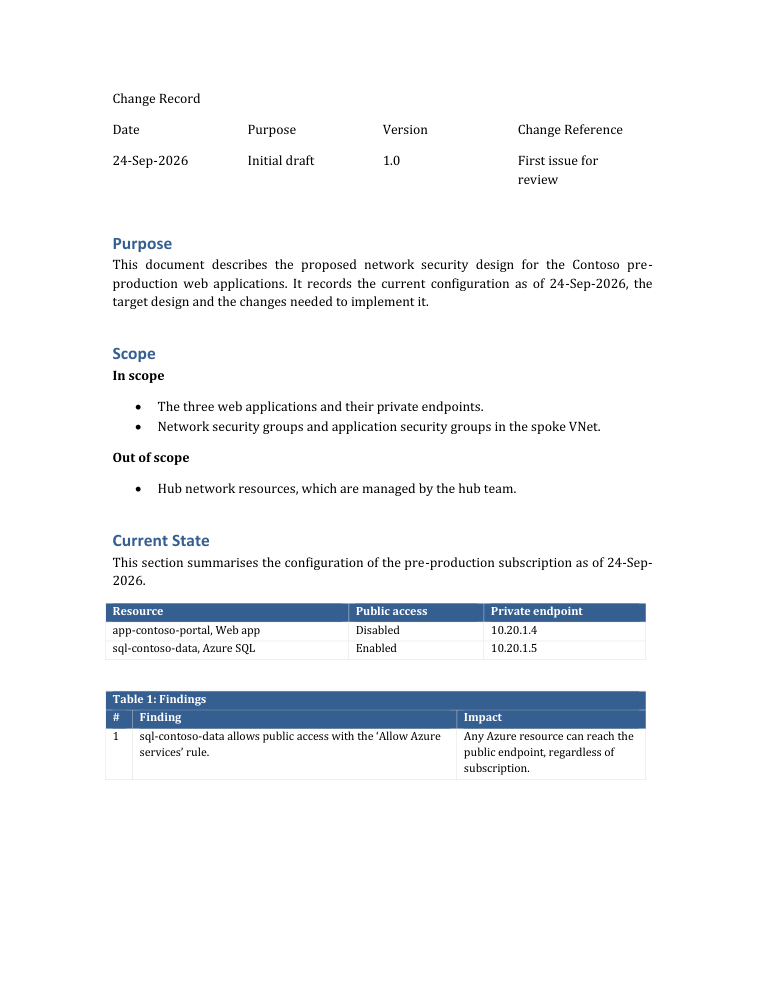
The agent writes the document as a short Python script on top of the client's .docx template, lets Word refresh the
table of contents and export a PDF, then runs check until nothing is reported. The template keeps its cover, change
record, header, footer, heading numbering and colours; the script only supplies content.
Install & usage
npx skills add keenskills/skills --skill writing-design-documentsnpx @keenskills/writing-design-documents initnpx @keenskills/writing-design-documents init --dry-run/plugin marketplace add keenskills/skills
/plugin install writing-design-documents@keenskillsExample prompts
New design documents
Claude builds the document from a script on your template and keeps its cover, change record and numbering.
Create a network security design document for the web apps in subscription X, using the template Template.docx, with diagrams from /drawing-architecture-diagrams.
Write the solution design for the payments platform on our Word template: purpose, scope, current state, target design and implementation plan.
Turn these architecture notes into a design document on Template.docx, with one landscape page for the diagram.
Assessments and findings
Turn these findings into a client assessment document on our template. Don't mention how the data was collected.
Write up the network review as a findings table with impact and recommendation, and state every fact as of today.
Mark anything we could not confirm as to be confirmed by the hub team.
Revisions
Update the design document: the private endpoint stays in its current subnet. Keep the change record.
Add a version 1.1 row to the change record and a section on DNS resolution, then refresh the table of contents.
Swap Figure 1 for the new diagram and keep the key flows table on the same page.
Checking a document
Run check on Design.docx and fix everything it reports.
Make this document read as written by a consultant: no em dashes, no bold lead-ins, no AI vocabulary.
Check the PDF for empty pages and table titles left at the bottom of a page.