page-as-data
v0.2.1Read a web page as data instead of a screenshot: what is on screen, what broke behind it, and layout defects at phone and desktop widths.
Paste it into Claude Code, Cursor or Codex.
npx skills add keenskills/skills --skill page-as-dataA screenshot vs the data
One page, a fixture with one of every bug. First what a screenshot shows, then what page-as-data read from it.
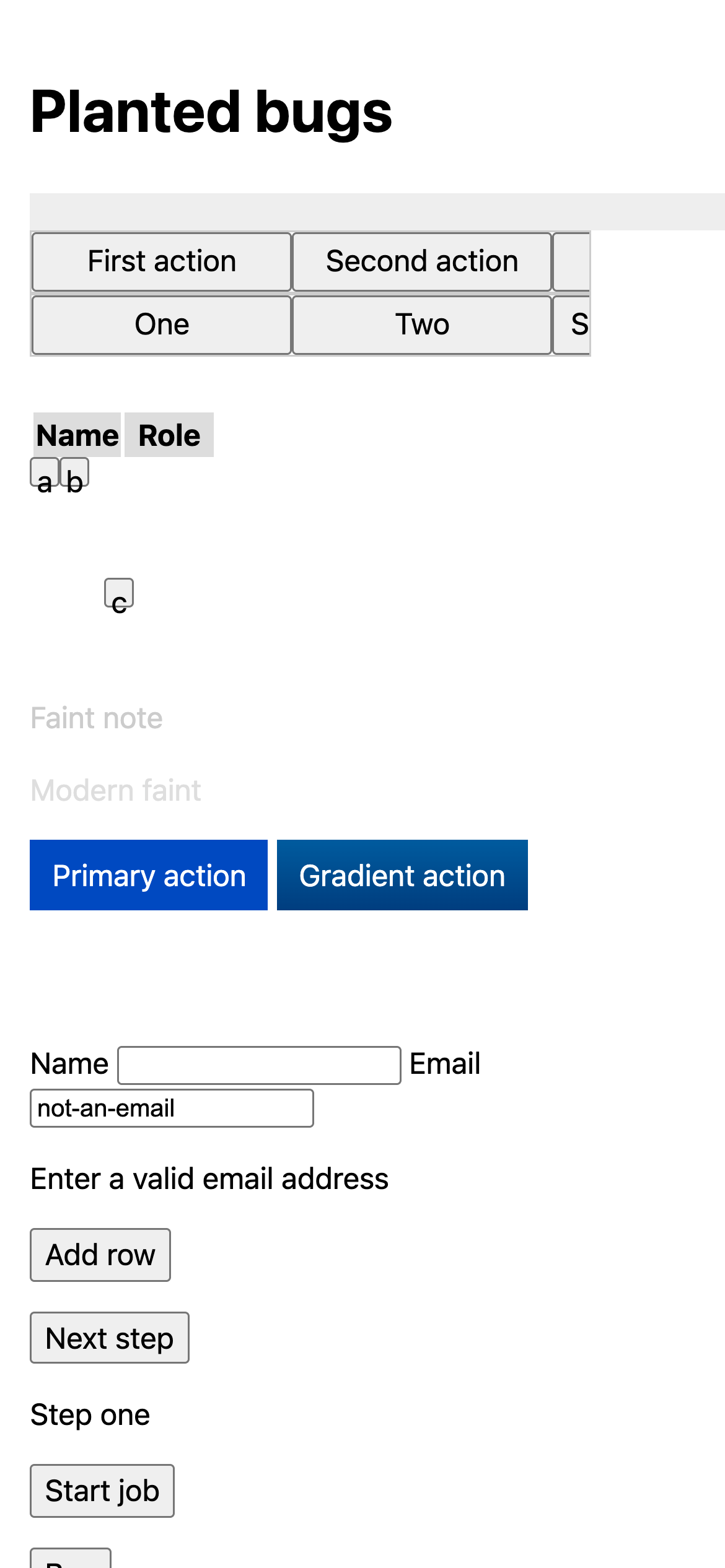
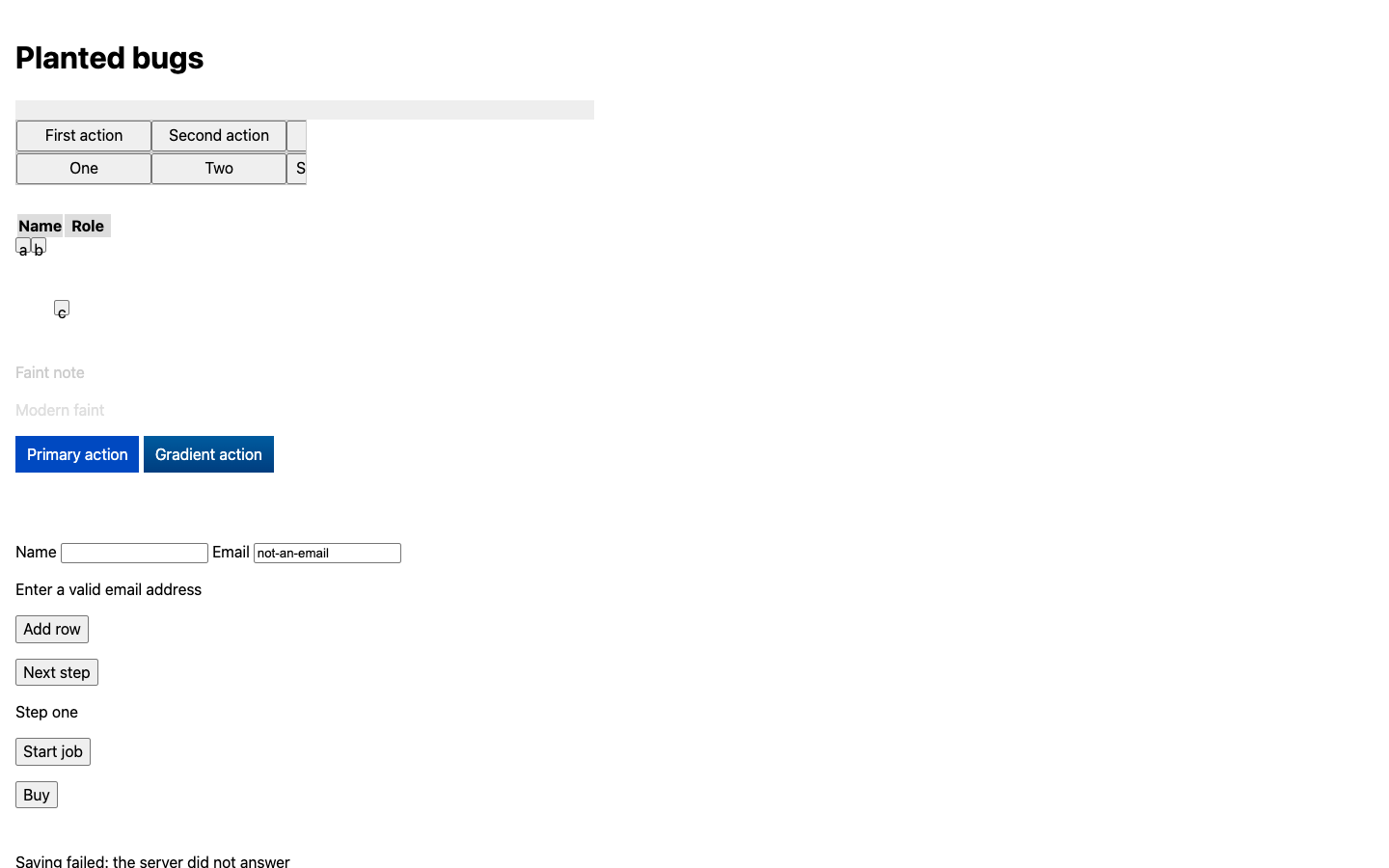
$ npx @keenskills/page-as-data read http://localhost:3000/ --width 390 --launch Fixture: planted bugs — / @ 390px, settled in 410ms PROBLEMS • uncaught exception: Error: Fixture uncaught error | at http://localhost:3000/:141:15 | at <anonymous>:68:26 • failed request: GET http://localhost:3000/missing-image.png → 404 • failed request: GET http://localhost:3000/hero.jpg → 404 • failed request: GET http://localhost:3000/api/missing → 404 • console.error: Fixture console error • broken image: http://localhost:3000/missing-image.png • invalid field "Email": Enter a valid email address • layout: Page is 616px wide in a 390px viewport, so it scrolls sideways • layout: button "Hidden action" is cut off (15% visible) by div.clipping-bar, and nothing scrolls to it • layout: th "Name" is sticky (top: 48px) inside div.table-box (overflow auto/auto), which never scrolls vertically, so it never sticks, and its offset pushes it 30px down over the content below • layout (warning): button "Crowded A" is 16×16px, under WCAG 2.2's 24×24px, and too close to button "Crowded B" • layout (warning): button "Crowded B" is 16×16px, under WCAG 2.2's 24×24px, and too close to button "Crowded A" OPEN DIALOGS [Confirm delete] This removes the venue. ALERTS / STATUS MESSAGES (alert) Saving failed: the server did not answer HEADINGS h1 Planted bugs h2 Confirm delete FORM FIELDS Name [text] = "" Email [text] = "not-an-email" INVALID: Enter a valid email address TABLE 0 — 1 rows Name | Role Grace | Admin BUTTONS AND LINKS First action · Second action · Hidden action · One · Two · Scrollable action · Crowded A · Crowded B · Lonely · Primary action · Gradient action · Add row · Next step · Start job · Buy print, AED 20 · Faded action TEXT ON SCREEN Planted bugs First actionSecond actionHidden action OneTwoScrollable action [table 0: 1 rows — see tables] ab c Faint note Modern faint Primary action Gradient action Caption on photo Name Email Enter a valid email address Add row Next step Step one Start job Buy Faded action Saving failed: the server did not answer Confirm delete This removes the venue.
Check it in CI
Every page at phone and desktop width. Exit 1 fails the build.
$ npx @keenskills/page-as-data check http://localhost:3000/ --widths 390,1440 --launch ✖ http://localhost:3000/ @ 390px error Page is 616px wide in a 390px viewport, so it scrolls sideways · div (div.wide-banner) ends at 616px error button "Hidden action" is cut off (15% visible) by div.clipping-bar, and nothing scrolls to it error th "Name" is sticky (top: 48px) inside div.table-box (overflow auto/auto), which never scrolls vertically, so it never sticks, and its offset pushes it 30px down over the content below error Uncaught: Error: Fixture uncaught error | at http://localhost:3000/:141:15 | at <anonymous>:68:26 error GET http://localhost:3000/missing-image.png → 404 error GET http://localhost:3000/hero.jpg → 404 error GET http://localhost:3000/api/missing → 404 warning button "Crowded A" is 16×16px, under WCAG 2.2's 24×24px, and too close to button "Crowded B" warning button "Crowded B" is 16×16px, under WCAG 2.2's 24×24px, and too close to button "Crowded A" warning console.error: Fixture console error ✖ http://localhost:3000/ @ 1440px error button "Hidden action" is cut off (15% visible) by div.clipping-bar, and nothing scrolls to it error th "Name" is sticky (top: 48px) inside div.table-box (overflow auto/auto), which never scrolls vertically, so it never sticks, and its offset pushes it 30px down over the content below error Uncaught: Error: Fixture uncaught error | at http://localhost:3000/:141:15 | at <anonymous>:68:26 error GET http://localhost:3000/missing-image.png → 404 error GET http://localhost:3000/api/missing → 404 error GET http://localhost:3000/hero.jpg → 404 warning button "Crowded A" is 16×16px, under WCAG 2.2's 24×24px, and too close to button "Crowded B" warning button "Crowded B" is 16×16px, under WCAG 2.2's 24×24px, and too close to button "Crowded A" warning console.error: Fixture console error 2 page checks · 13 errors · 6 warnings
Read a web page as data instead of a screenshot.
When you, or an AI coding agent, fix a bug in a web app, you usually take a
screenshot and look at it. A screenshot shows pixels. It cannot tell you that a
button is cut off by its container, that a request failed with a 404, or that
the page threw an error while loading. page-as-data tells you all of that as
plain text or JSON, in one command.
Take a screenshot only for what data cannot answer: images, charts, and "does it look right overall".
One screen, read both ways. An orders page from a made-up admin app at phone width (source), read once as a screenshot and once with:
npx @keenskills/page-as-data read http://localhost:4173/orders.html --width 390 --launch --inspect "Pending"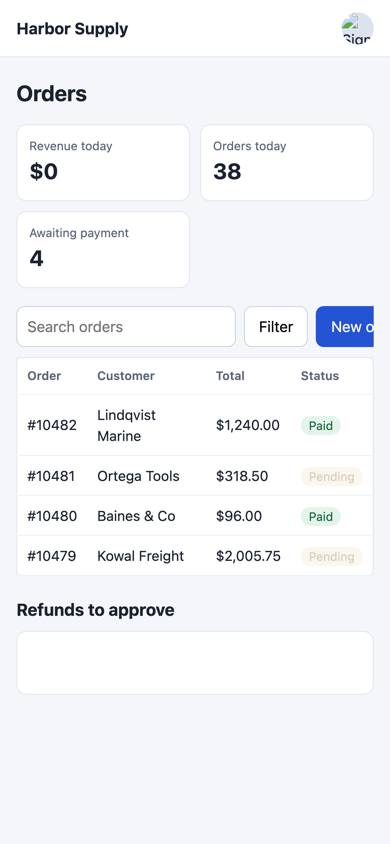
The screenshot looks like a quiet day: revenue is $0, the refunds box is empty, and a button is slightly off the edge. The read starts with why (full output):
PROBLEMS
  • uncaught exception: TypeError: Cannot read properties of undefined (reading 'map')
  • failed request: GET http://localhost:4173/avatars/m-okafor.png → 404
  • failed request: GET http://localhost:4173/api/orders/summary → 404
  • broken image: http://localhost:4173/avatars/m-okafor.png
  • layout: button "New order" is cut off (57% visible) by div.toolbar, and nothing scrolls to it
  • layout: button "Export CSV" is cut off (0% visible) by div.toolbar, and nothing scrolls to it

INSPECT "Pending" — 2 found
span "Pending" … contrast 1.45:1 (TOO LOW)| Screenshot | page-as-data read | |
|---|---|---|
| Input tokens | 2,477 | 757 |
| Failed requests | Not shown: the $0 looks like a real number | Both 404s, with URLs |
| Uncaught exception | Not shown: the refunds box is just empty | The error and its line |
| "Export CSV" button | Not on screen, so nothing to notice | Cut off, by which element |
| "Pending" badge | Faint, hard to judge | Contrast 1.45:1, too low |
| Table contents | Read off the picture | Four rows as text |
Tokens were counted by sending each one to Claude (Haiku 5.5) on its own and
subtracting the same request without it. The screenshot is the 1170×2532 PNG
that --screenshot saves for a phone width; the read is the whole text output,
1.6 KB. That is about a third of the tokens, and the read is the one that names
all five bugs.
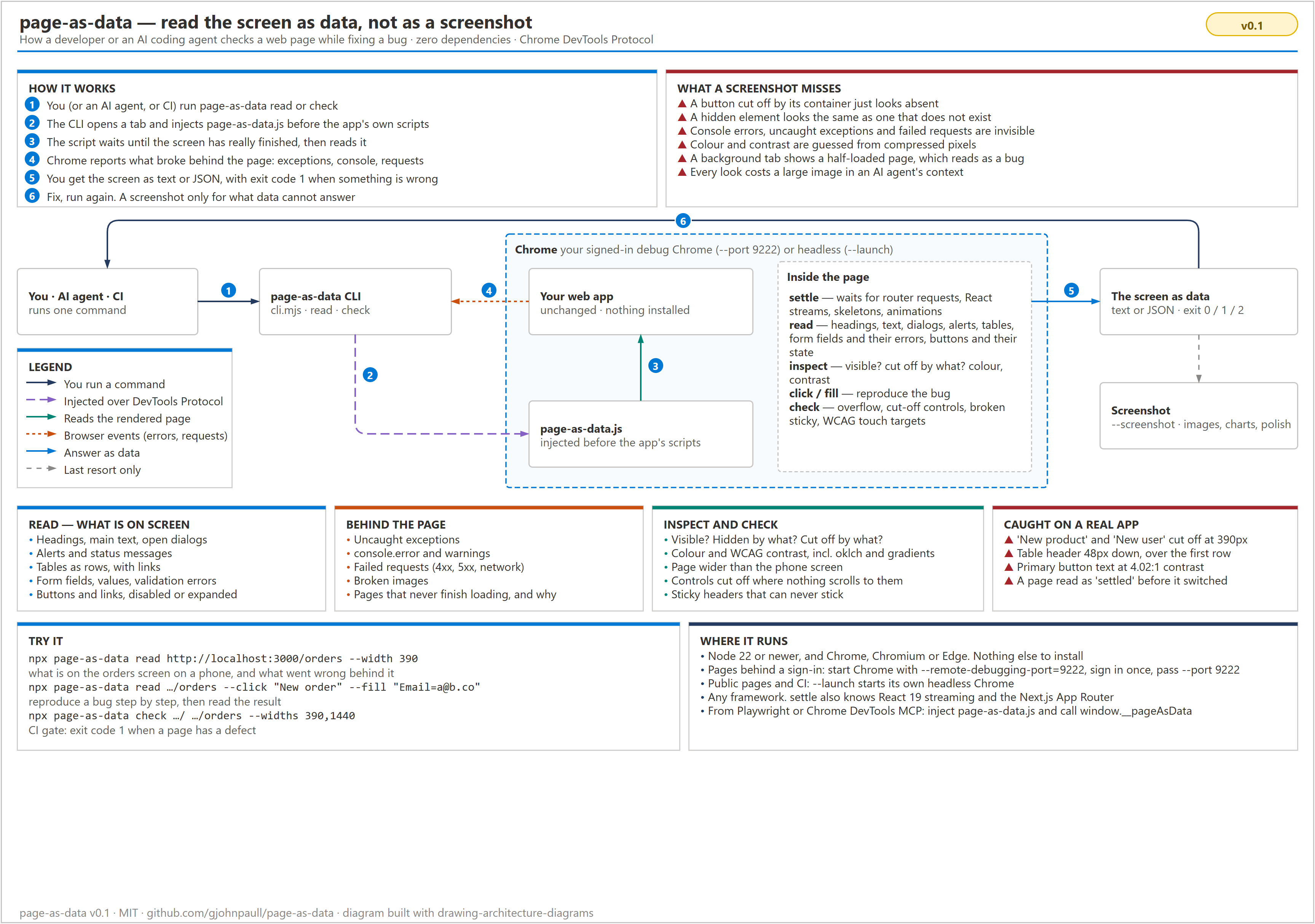
Full guide: docs/usage.md.
Install & usage
npx skills add keenskills/skills --skill page-as-datanpx @keenskills/page-as-data initnpx @keenskills/page-as-data init --dry-run/plugin marketplace add keenskills/skills
/plugin install page-as-data@keenskills